
Open to remote roles

Hi, I'm Stella Igboko

Cloud & DevOps Engineer building secure, scalable infrastructure

9

Years as Operations Manager

3

Years as Facility Manager

2

Years in Cloud Engineering

Stella Igboko — Cloud & DevOps Engineer

What I do

Services

Cloud Architecture

Designing and deploying secure, scalable infrastructure on AWS and Azure — VPCs, EC2, S3, IAM, and cross-cloud networking.

DevOps & Automation

Building reliable deployment workflows with Git, GitHub, load balancing (HAProxy), and infrastructure best practices.

IT Support & Security

Strong troubleshooting, networking, and system support skills, with a solid foundation in IAM and access control best practices.

Portfolio

Selected work

All projects →
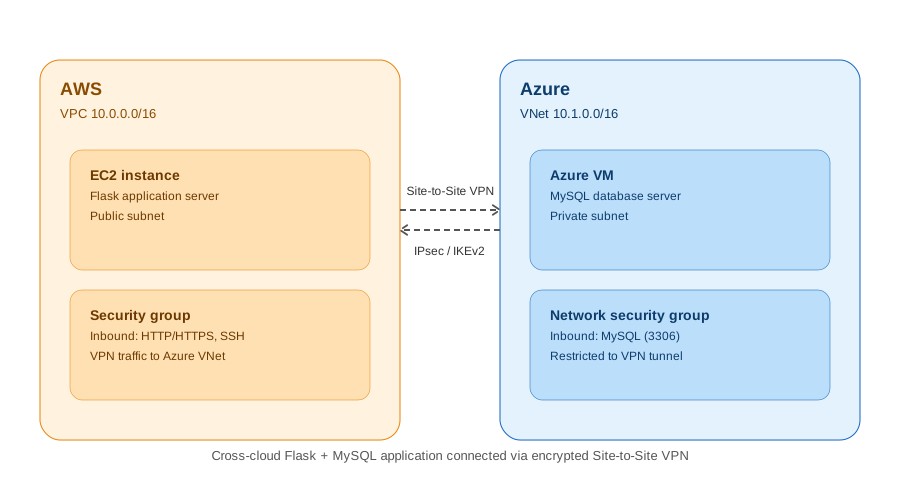
Cross-cloud VPN architecture — AWS to Azure
AWS Azure VPN

Cross-Cloud VPN: AWS & Azure

A Flask and MySQL application deployed across two cloud providers, connected through a secure Site-to-Site VPN tunnel using IPsec/IKEv2 — with the app hosted on an AWS EC2 instance and the database running on an Azure VM.

Built VPC and VNet architecture from scratch, configured route tables, security groups, and network security groups on both sides, and verified end-to-end connectivity between the two clouds.

View case study
>
HAProxy Load Balancer Deployment
AWS • HAProxy • Nginx Load Balancer

HAProxy Load Balancer Deployment

Designed and deployed a highly available web infrastructure on AWS using HAProxy to distribute incoming traffic across multiple Nginx web servers hosted on Ubuntu EC2 instances. Configured backend servers, health checks, and load balancing to improve reliability, scalability, and application availability.

View case study →
AWS S3 Static Website Hosting" alt="AWS S3 Static Website Hosting" loading="lazy">" alt="AWS S3 Static Website Hosting" loading="lazy">?w=800&q=80"alt="AWS S3 Static Website Hosting" loading="lazy">

AWS S3

AWS S3 Static Website Hosting

Static website hosted on Amazon S3 with EC2, Nginx, VPC, and IAM configured for secure, scalable delivery. Fully deployed and served live.

View case study →
Stella igboko

About me

A bit about
who I am

I'm Stella Igboko, a Cloud & DevOps Engineer based in Umuahia, Nigeria, with about 2 years of hands-on experience across AWS and Azure. I hold a DevOps & Cloud Security Certification and bring a unique perspective from my background in operations and facility management.

My hands-on work includes deploying a static website on AWS S3 with EC2, Nginx, and IAM; building a highly available HAProxy load balancer across multiple Nginx servers; and architecting a cross-cloud Flask/MySQL app connected via a secure Site-to-Site VPN between AWS and Azure. I'm currently open to fully remote roles and share my cloud journey through #LearningInPublic on LinkedIn,

AWS. Azure Docker Git Linux Nginx HAProxy AWS

Insights

Latest LinkedIn Posts

View LinkedIn →
Why I ditched CSS frameworks
Design Mar 8, 2025

Static vs Dynamic IP Addresses: A Networking Fundamental Every IT Professional Should Know

As I continue strengthening my foundation in networking and cloud computing, I revisited one of the core concepts every IT professional should understand: IP addresses by operation method. Although every device connected to a network needs an IP address, not all IP addresses work the same way. They generally fall into two categories: 🔹 1. Static IP Address A Static IP Address remains the same over time. It is manually assigned or reserved for a specific device. Best suited for: ✅ Web Servers ✅ Email Servers ✅ DNS Servers ✅ Network Printers ✅ CCTV Systems Advantages: ✔️ Reliable and consistent connectivity ✔️ Ideal for remote access and hosting services ✔️ Easier to manage network resources Challenges: Requires manual configuration Can be more expensive Needs strong security because the address remains unchanged 🔹 2. Dynamic IP Address A Dynamic IP Address is assigned automatically by a DHCP server whenever a device connects to a network. This address may change over time. Commonly used for: 💻 Laptops 📱 Smartphones 🖥️ Desktop Computers 🏠 Home and Office Networks Advantages: ✔️ Automatic configuration ✔️ Efficient use of IP addresses ✔️ Easier to manage large networks Challenges: IP address may change after reconnecting Not ideal for hosting public services without additional configuration 📊 Quick Comparison Static IPDynamic IPFixed addressChanges automaticallyManual assignmentAssigned by DHCPBest for serversBest for everyday devicesEasier for remote hostingEasier for general internet access 💡 A Simple Analogy 🏡 Static IP is like owning a house—you always have the same address. 🏨 Dynamic IP is like staying in a hotel—your room number may be different each time you check in. Every networking concept I learn reinforces how critical strong fundamentals are in Cloud Computing, DevOps, and IT Support. Understanding something as basic as IP addressing helps make more advanced topics like cloud networking, virtual machines, load balancing, and security much easier to grasp. 📚 Learning never stops, and every concept mastered is another step toward becoming a better cloud professional. Which do you use more often in your environment—Static IPs or Dynamic IPs, and why? I'd love to hear your experience in the comments! #Networking #CloudComputing #AWS #Azure #DevOps #ITSupport #CyberSecurity #LearningInPublic #TechCommunity #CareerGrowth 1 .

Read more →
Design systems
Dev Feb 21, 2025

Before You Touch a VPC, You Need to Understand These 6 Network Types LAN, WAN, MAN, PAN, SAN, and VPN .

Covers a small area like your home, office, or classroom. High speed, privately owned. Your home Wi-Fi? That's a LAN. 🔵 WAN – Wide Area Network Spans cities, countries, and even the entire globe. The internet itself is the world's largest WAN. Banks and multinationals run their own WANs too. 🟣 MAN – Metropolitan Area Network Sits between LAN and WAN — covers a whole city or large campus. Think of it as the "city-sized" network. ISPs often use MANs to connect neighborhoods. 🟠 PAN – Personal Area Network The smallest network — it's literally the one around you. Your phone connecting to your Bluetooth earbuds and smartwatch? That's a PAN in action. 🟡 SAN – Storage Area Network A specialized, high-speed network that connects servers to shared storage systems. Critical in data centers and enterprises that need fast access to large volumes of data. 🔒 VPN – Virtual Private Network This one's special — it's not a physical network. A VPN creates an encrypted tunnel over a public network (like the internet), making your connection private and secure. Remote workers rely on this daily. ☁️ Why this matters for Cloud/DevOps: Every time I set up a VPC on AWS, I'm essentially building a LAN in the cloud. Every time I connect to a remote server securely, I'm using VPN principles. Understanding these categories gives me the mental model to design better, more secure cloud architectures. Networking isn't just for network engineers — it's the foundation of everything we build in the cloud. If you're learning cloud or DevOps, start here. The concepts layer beautifully. #LearningInPublic #CloudComputing #DevOps #Networking #AWS #CloudEngineer #TechCareer #WomeninTech #Nigeria 3 1 Read more →

Freelance lessons
AWS Architecture Jan 14, 2025

The Day I Realized AWS Didn't Invent Networking — It Just Virtualized It I was studying network devices last week when it hit me — I had already built all of these in AWS. I just didn't know it.

🔘 Hub — The old-school broadcaster Sends every packet to every device. No intelligence, no filtering. Like shouting in a room. Mostly obsolete today, replaced by switches. 🟢 Switch — The smart traffic director (Layer 2) Learns which device is on which port using MAC addresses and delivers packets only to the right destination. Like a post office — letters go to the right mailbox, not every house. → AWS: Your VPC routes traffic like a smart switch 🔵 Router — The network navigator (Layer 3) Connects different networks and directs traffic using IP addresses. Your home router connects your LAN to the internet. → AWS: Route Tables direct traffic between subnets, IGW, and beyond 🔴 Firewall — The security gatekeeper Monitors traffic and enforces Allow/Deny rules based on IP, port, and protocol. Nothing gets in or out without passing inspection. → AWS: Security Groups (instance level) + NACLs (subnet level) + WAF 🟡 NAT — The address translator Lets multiple devices share one public IP. Your private IP (192.168.x.x) never gets exposed to the internet — NAT swaps it for your public IP on the way out, and reverses on the way back. → AWS: NAT Gateway does exactly this for private subnet instances The beautiful thing? Everything I'm learning in AWS maps directly back to these fundamentals. VPC = your LAN in the cloud. Security Groups = your firewall. NAT Gateway = NAT. Route Tables = your router. The cloud didn't replace networking — it just virtualized it. #LearningInPublic #CloudComputing #DevOps #AWS #Networking #CloudEngineer #WomeninTech #Nigeria #TechCareer 3 1 .

Read more →

Get in touch

Let's work
together

"I'm open to Cloud & DevOps roles — remote, globally open. AWS infrastructure, CI/CD pipelines, cloud security, or a second pair of eyes on your architecture — let's talk."